
Mood, symptoms and situations
Face menu, entry sheets, situations, "Still ongoing?" card
Opening the face menu
Tap the 🙂 face at the bottom left of the home screen. A glass circle is drawn around the button with three choices: "Mood", "One-time symptoms" and "Situation". The button becomes a ✕, and the + note button disappears while the menu is open.
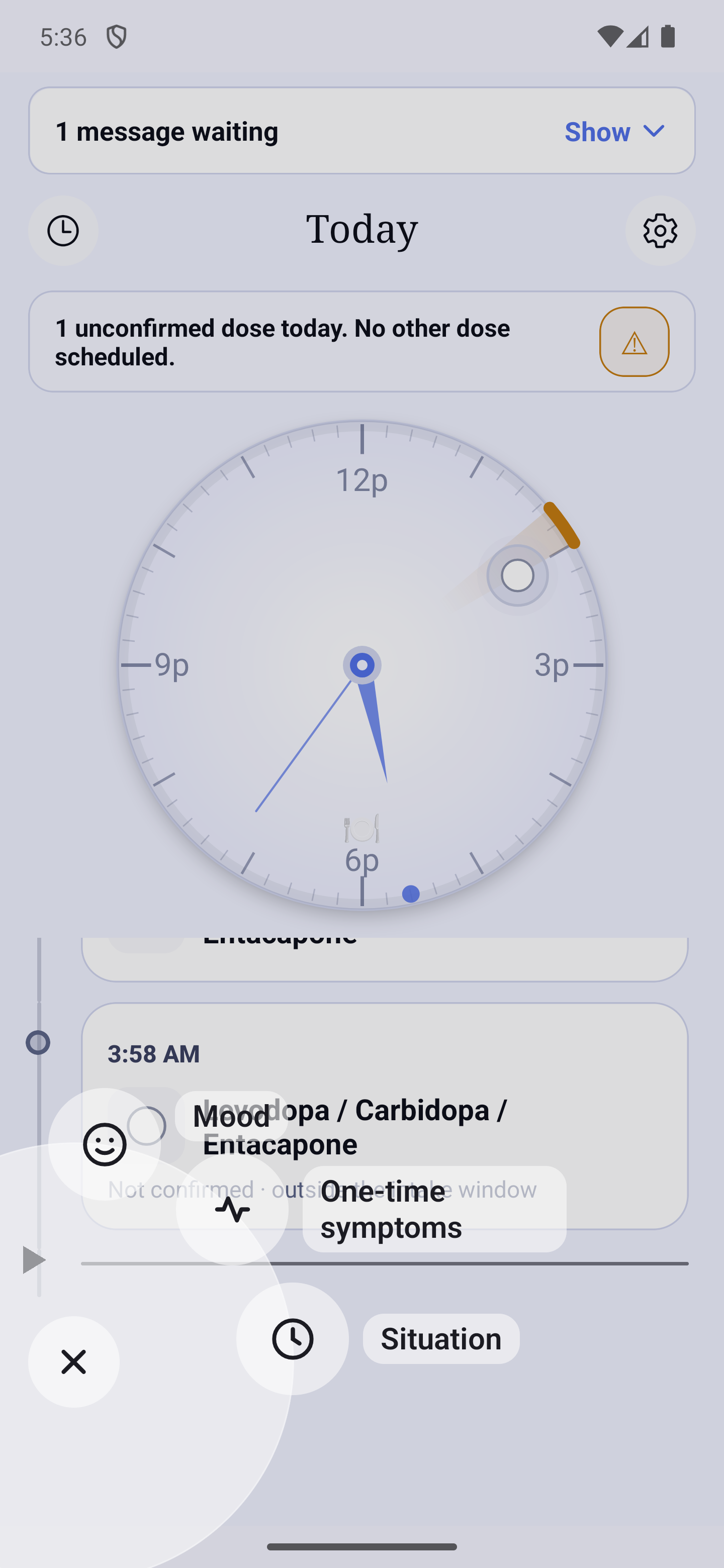
- Tap a choice to open its sheet. Every choice responds as soon as it appears: no need to wait for the animation to end.
- To close without choosing, tap the ✕, the dark background or, on Android, the Back button.
- With "Reduce Motion" (phone settings), the menu appears in a single fade.
- On a small screen, with very large text, or with VoiceOver / TalkBack, the three choices stack in a vertical list above the button: nothing is cut off and the text is never made smaller. A screen reader announces "Menu, 3 items"; the third choice reads "Situation, ongoing" while a situation is ongoing.
The same sheets also open from other places, always on the home screen: the notification of a mood reminder (and its banner while the app is open), the "HoraDose — Comment ça va ?" button of the Control Center, the Quick menu and the Lock Screen widget (iPhone), the quick-settings tile (Android) — all open the mood sheet — and the ongoing-situation banner, which opens the "Situation" sheet. A request that arrives while a sheet is already open is ignored: never two sheets at once.
How a sheet looks
The capture sheets, like the "Edit" ones, look like the "Which dose?" window: they fade in over a dark veil, the card resting at the bottom of the screen. They have no handle and do not close by dragging.
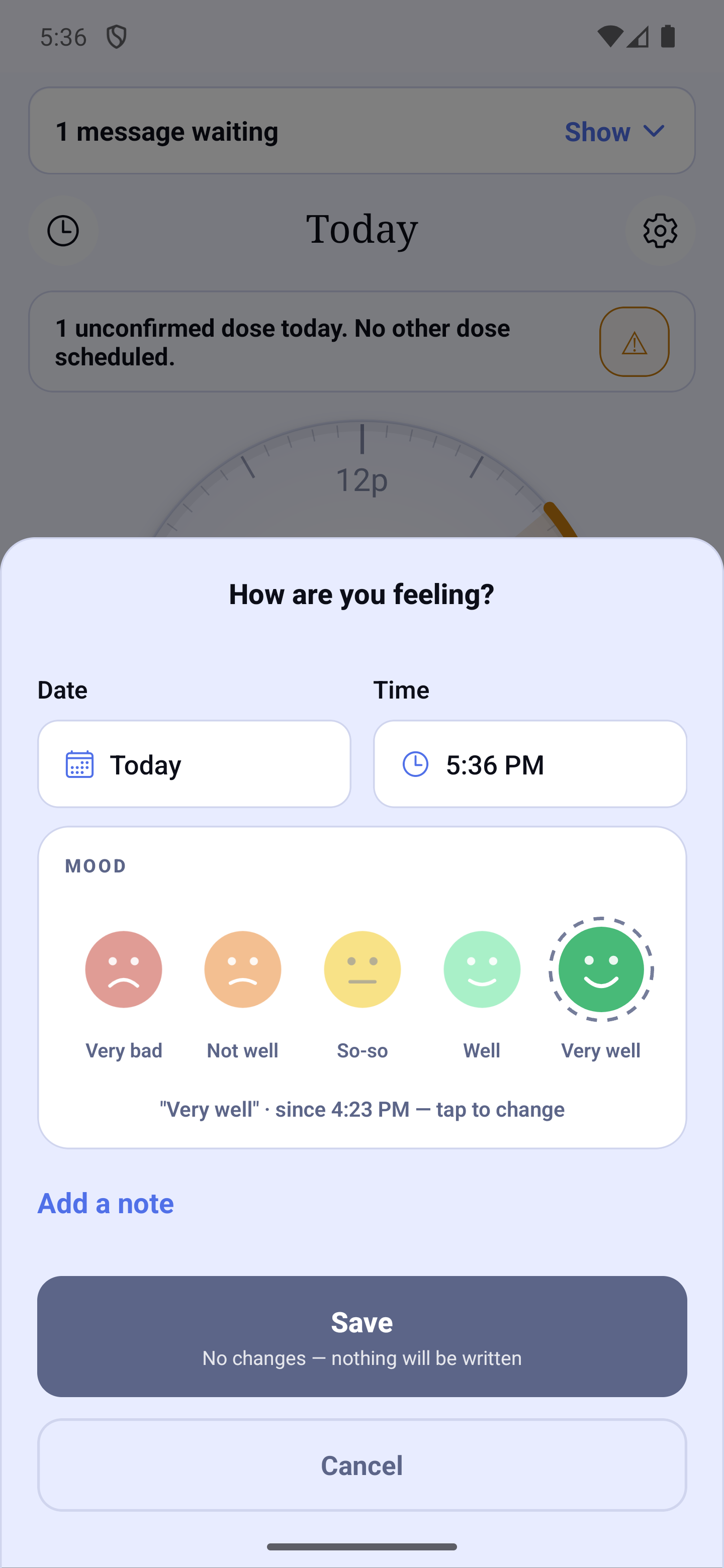
- Date and Time sit on one line, two boxes of the same width. The time offered is always the current time, even for a past day. Tap the date: a "Choose the date" calendar opens, days to come are greyed out. Tap the time: a wheel opens.
- An impossible day or time is refused with its reason, written under the row — "Not in the future", "Not before the start of the situation, 08:10", "Not before October 12" (the oldest day the free version lets you choose) — and is never corrected silently.
- "Add a note" opens a small "Note" dialog over the sheet: write, then Save (above) or Cancel. A note is at most 500 characters; a counter ("400 / 500") appears from 400. Once written, the note shows in italics under the link, which becomes "Edit note".
- The buttons at the bottom are stacked: "Save", with a sentence under it saying what will be written (for example "Mood "Well" · at 14:32"), then "Cancel".
- You close with "Cancel", by tapping the dark background, or, on Android, with Back. If you have already entered something, HoraDose first asks "Discard changes?" ("Don't Save" or "Cancel").
- After "Save", the sheet closes and the Journal opens on the day of the entry, where the new card is briefly outlined. A screen reader announces "Saved in the Journal of …".
- Each sheet has its own short guided tour (three bubbles at most), shown once; ⚙ then "Replay the tour" plays it again.
Mood
"Mood" opens the "How are you feeling?" sheet: tap one of the 5 faces, then Save.
| Level | Color | Name on the sheet |
|---|---|---|
| 1 | Red | Very bad |
| 2 | Orange | Not well |
| 3 | Yellow | So-so |
| 4 | Green | Well |
| 5 | Blue | Very well |
- The face of your mood of the day is preselected discreetly, with a sentence such as ""So-so" · since 13:05 — tap to change". A mood from yesterday or earlier is written as past information, never as today's.
- Each Save of a face adds a dated entry, even at the same level as the previous one: the statistics count all your entries. While no face is chosen, the button is disabled and the sentence under it says "No changes — nothing will be written".
- A note written without touching a face rides on today's face; if there is none, the sentence says "Choose a face".
- The "Skip reminders this time" box only appears if a follow-up reminder is set for the chosen level (see "Notifications and reminders").
- The Journal, the statistics and the report call these same levels "Terrible, Poor, Okay, Good, Great".
One-time symptoms
"One-time symptoms" records symptoms just once, right now; nothing stays open.
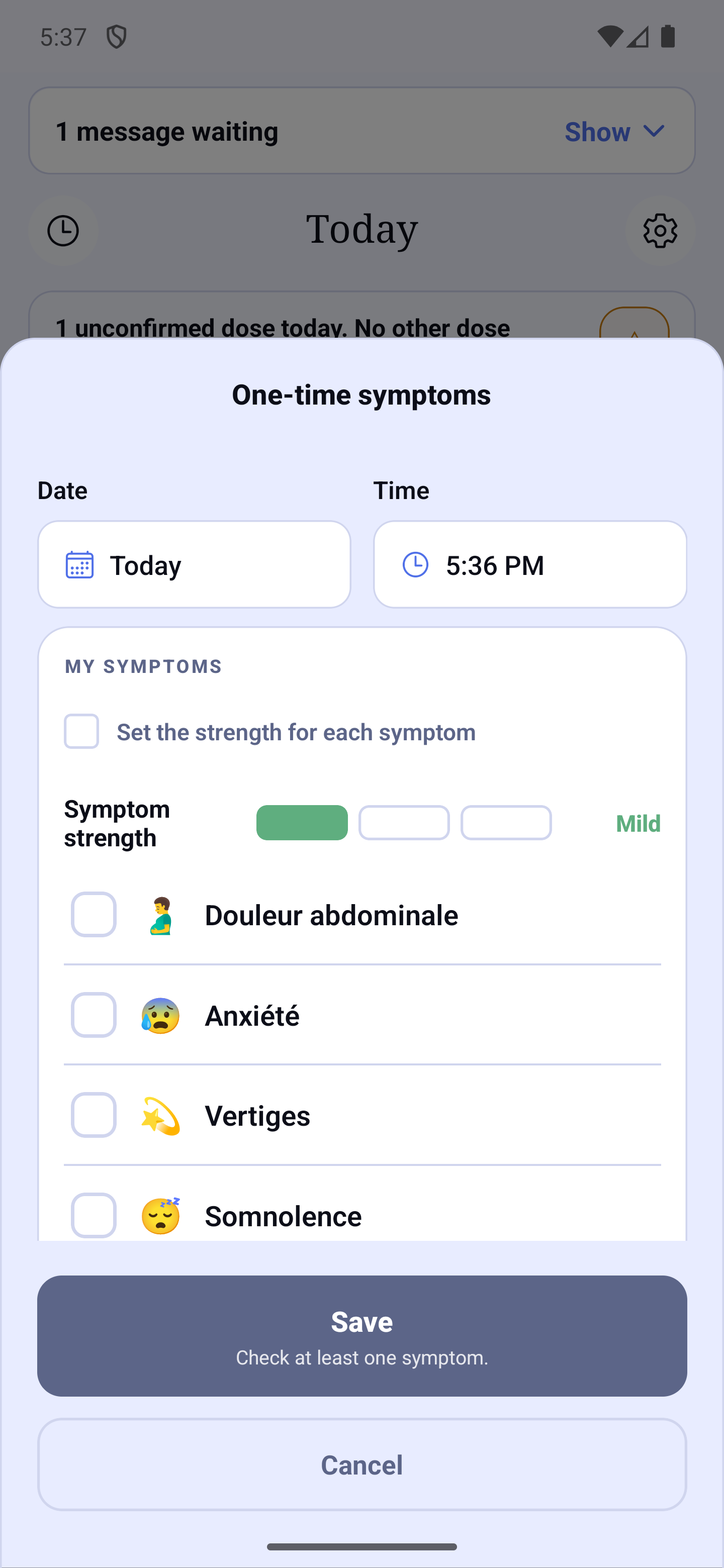
- Check your symptoms in the My symptoms zone (your "My list"), set the strength Mild, Moderate or Severe — for all at once, or symptom by symptom with the "Set the strength for each symptom" box — add a note if you like, then Save. While no symptom is checked, the button is disabled and the sentence under it says "Check at least one symptom."
- "Configure my symptoms" sets the sheet aside, opens "My symptoms", and gives the sheet back when you return, with what you had entered.
- During an ongoing situation, a "Add to "name" (ongoing) instead" link offers to note into the situation instead; it disappears as soon as a symptom is checked. The time cannot be before the start of the situation.
- In the Journal, a one-time entry is a dashed frame.
Situation
"Situation" follows an episode over time. There are two sheets, depending on whether a situation is already ongoing.
Starting a situation
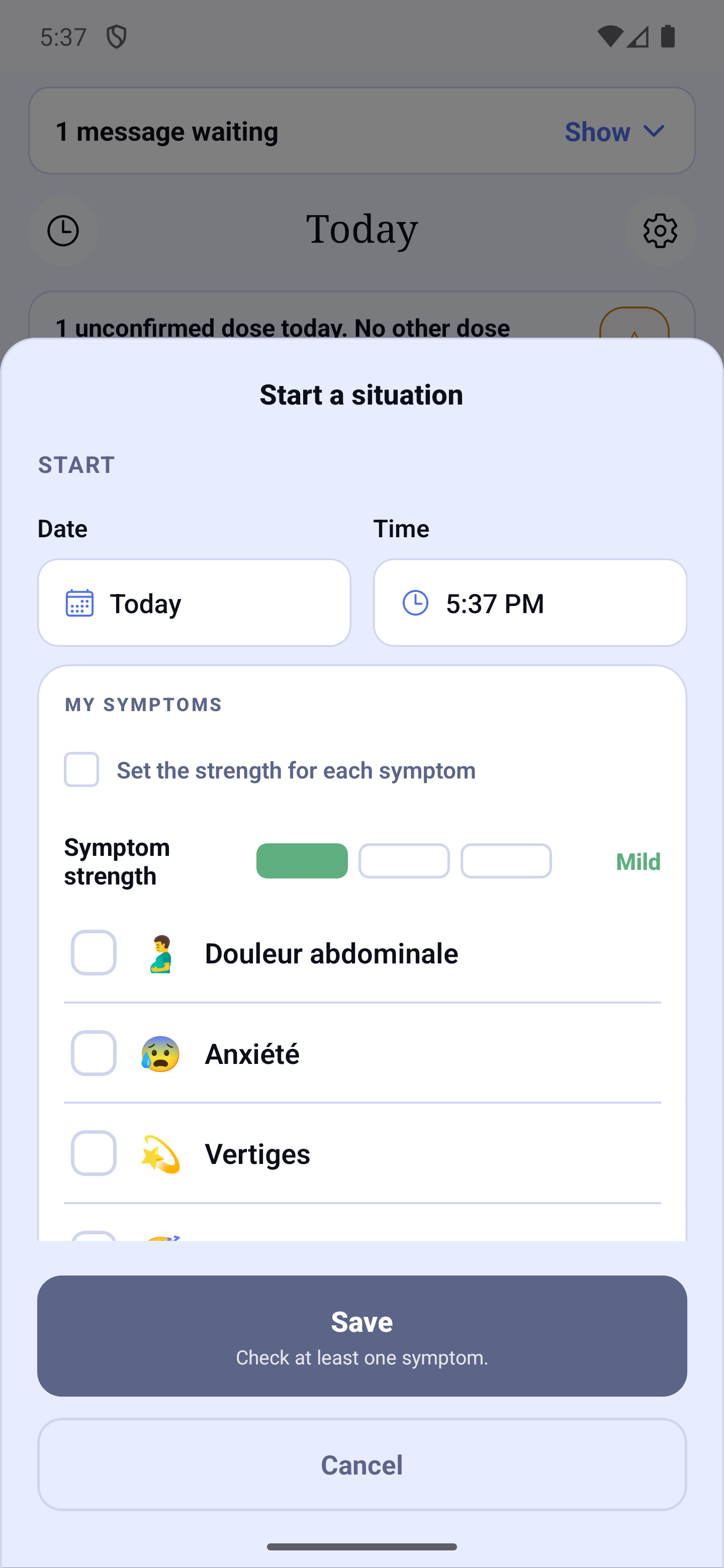
- The "Start a situation" sheet has a "Start" heading above Date and Time. If you have saved groups (for example "Morning tremors"), a window first offers a group or "New situation".
- Check the symptoms, set their strength, add a note if you like, then Save.
- If the start is on a day before today, HoraDose asks "Is "name" still ongoing?" with three buttons: "Yes, still ongoing" (the situation stays ongoing), "No, it has ended" (you then pick the end in the same dialog: "Ended at:", Date, Time and the duration; the start and the end are saved together) and "Close" (back to the sheet, your entry is kept). If the situation started earlier today, no question is asked.
An ongoing situation
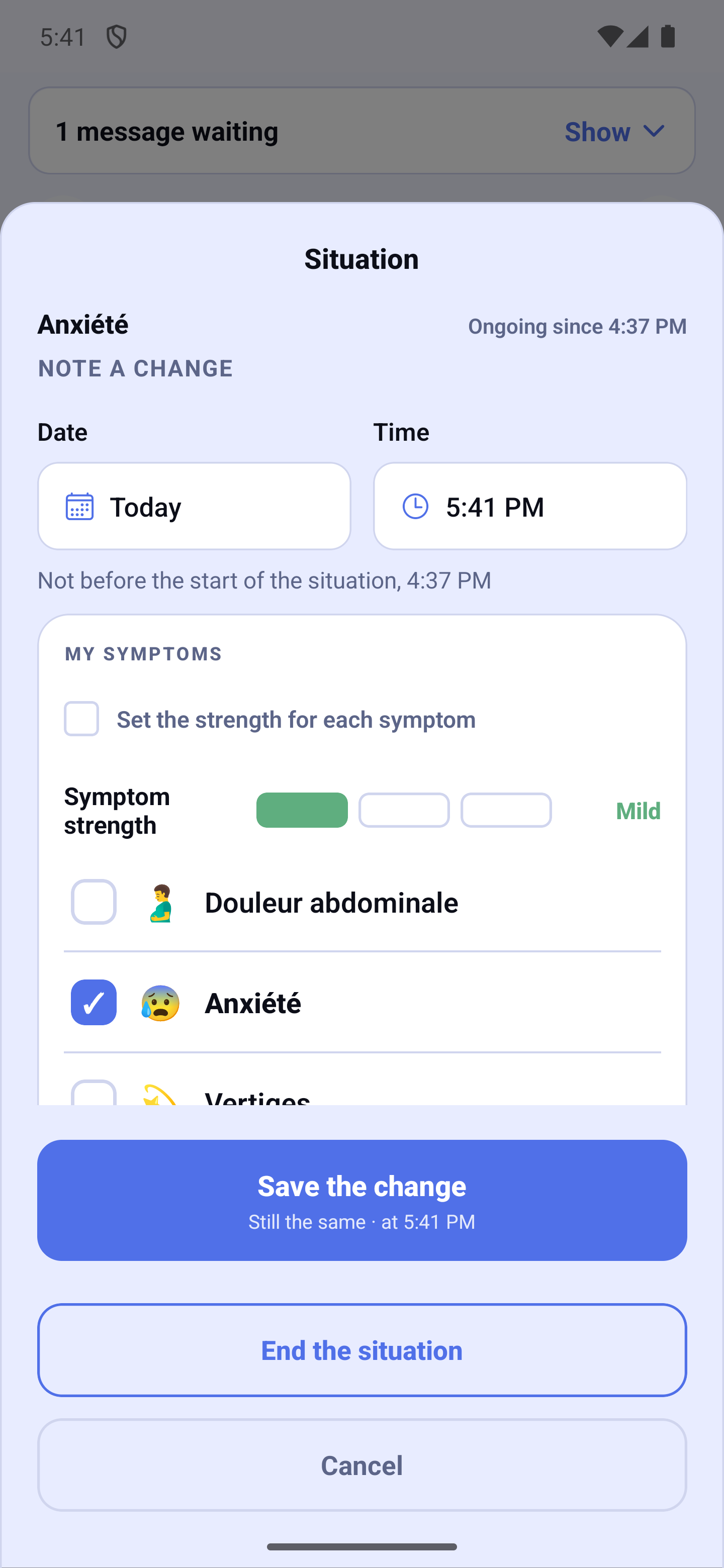
- A blue card, the first card of the messages at the top of Home, says "name — in progress" with the start time. Tap it, or tap its ✎, to open the "Situation" sheet.
- The "Situation" sheet shows the name and "Ongoing since 08:10" ("since yesterday 21:00", "for 3 days"), then "Note a change" above Date and Time. The list repeats the symptoms of the last observation, already checked.
- "Save the change" stays possible without changing anything: the sentence under it then says "Still the same · at 13:05" and a one-line card is added to the Journal. If you change something, it says "What changed · at 13:05".
- "End the situation" opens the end dialog: "Ended at:" (now, by default), Date and Time, the recorded duration in plain words (days and hours, never "47 h"), an optional note, then End. The end cannot be before the start or in the future. A "Situation ended at 15:30" message stays for a few seconds.
- If no observation has been noted for more than 6 hours, HoraDose asks on opening whether the situation is "still ongoing?"; "Later" postpones the question.
Keeping a group
At the end of a situation, HoraDose may ask "Keep these symptoms for next time?": give it a name if you like ("Group name (optional)"), then "Keep this group", or answer "No thanks". Your groups are managed in My symptoms.
The "Still ongoing?" card on the home screen
When a situation is ongoing and you reopen the app after 15 minutes or more away (or when the app starts), the card on Home becomes a question: "Is "name" still ongoing?", with "since …" under it, and two full-width buttons: "Yes, still ongoing" and "No, it has ended".
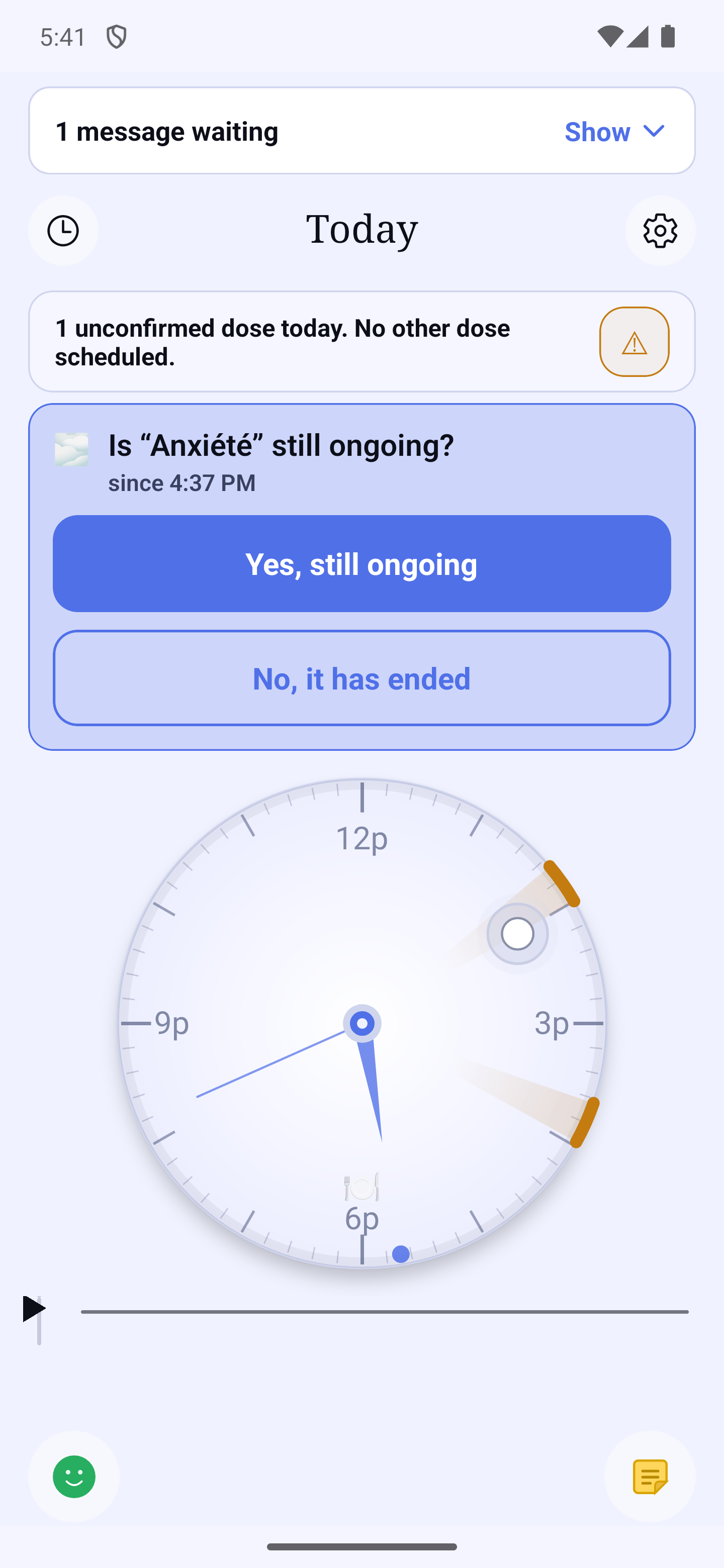
- The card hides nothing: the next-dose band and your dose tiles stay visible.
- "Yes, still ongoing": the card goes away and the banner returns to normal. It only comes back at your next return after 15 minutes. This answer counts as an observation: it also lifts the "duration not confirmed" mention.
- "No, it has ended" opens the end dialog (time to choose, duration): a situation is never ended without you choosing the time. "Close" leaves the card in place. You stay on the home screen, and the "Situation ended at …" message appears.
- When you open the app from a dose reminder, the card does not show (you came to take a dose); it comes back at the next return.
- It does not appear while you are acting for a loved one (caregiver mode).
For which day?
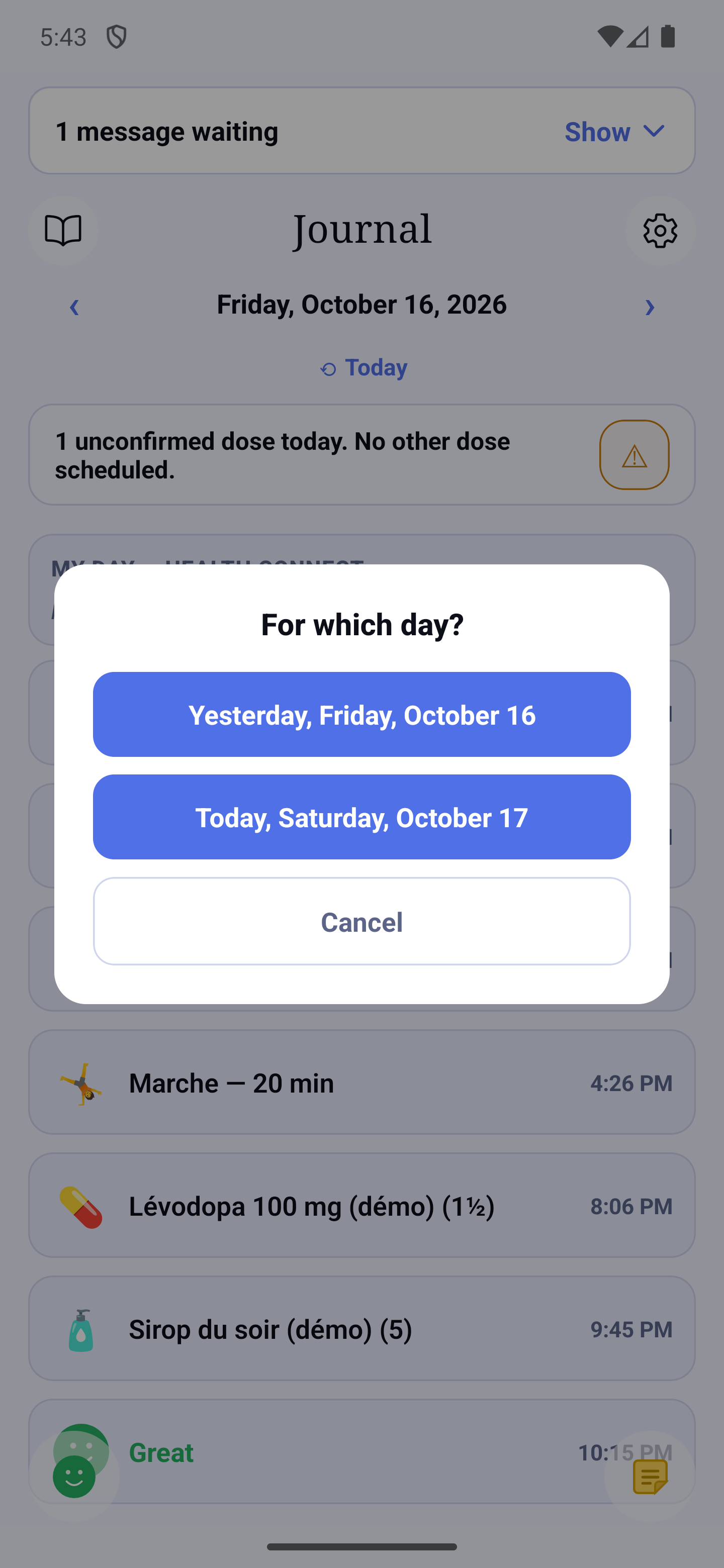
When you add something from a past day of the Journal — a mood, one-time symptoms, a situation, a note or a dictation — HoraDose first asks "For which day?". Two buttons of equal weight, with nothing preselected: the day you were looking at (for example "Yesterday, Thursday, October 16") and "Today, …"; "Cancel" is at the bottom. The sheet then opens on the chosen day. No question is asked for today, nor to edit an entry that already exists (it keeps its date).
Correcting or deleting from the Journal
In the Journal:
- A mood: tap the ⋮ of its card, then "Edit mood" or "Delete this mood". The "Edit mood" sheet shows its date, time, face and note, which you can change. Buttons: Save, Cancel (deleting is done from the card's ⋮). If nothing changed, Save simply closes the sheet.
- A one-time entry (dashed frame): the frame's ⋮ opens a menu: "Edit the symptom" (time, symptoms, strength, note); "Delete this symptom" (in red, in that menu) removes it.
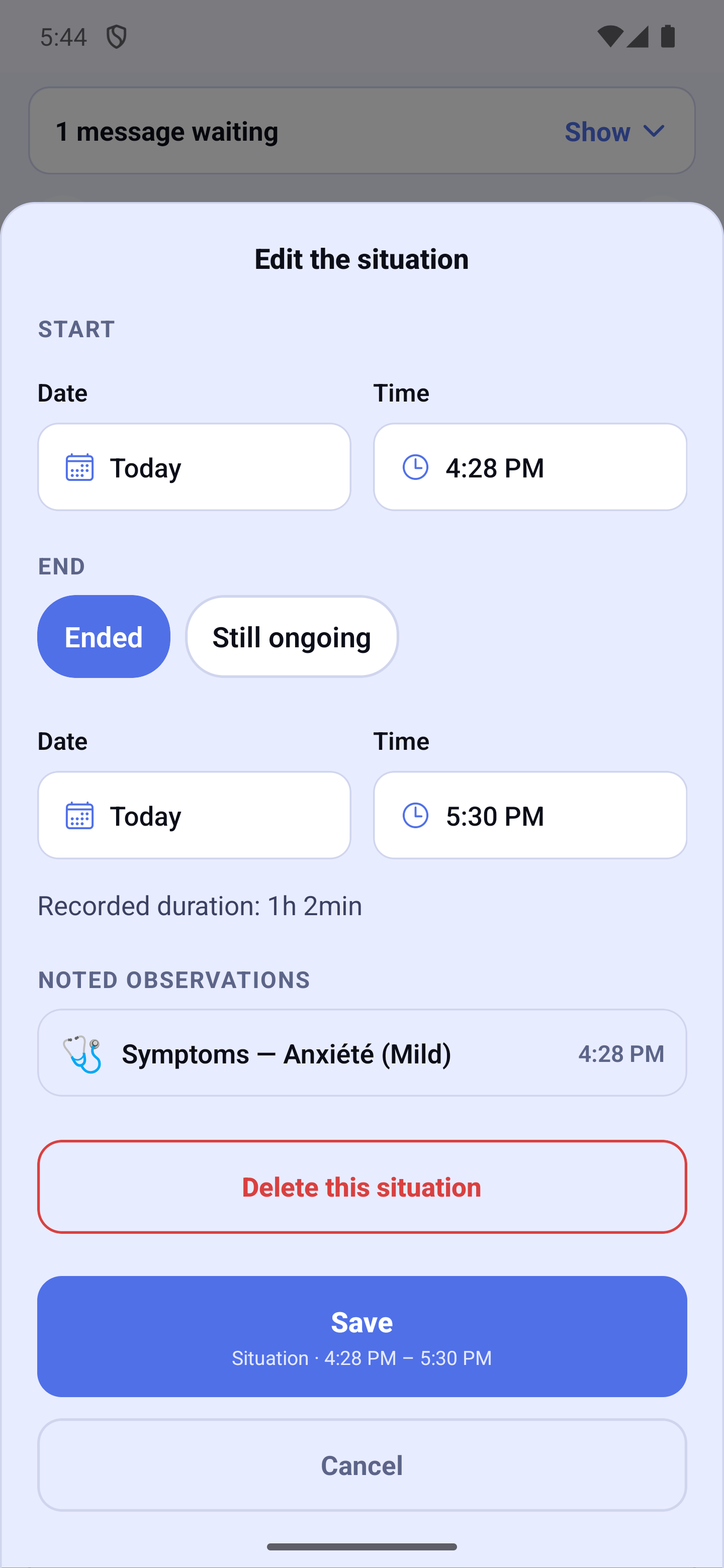
- A situation (blue frame): the frame's ⋮ opens a menu: "Edit the situation". Start: day and time (the start can be moved back up to 7 days before the original start); End: "Ended" with its time, or "Still ongoing" to make the situation ongoing again (not possible while another one is ongoing), with the recorded duration; Noted observations: each observation with its time, symptoms, strength and note — tap one to edit it in the same sheet, "Remove this observation" removes it after a confirmation (the last one cannot be removed), "Add noted symptoms" adds one at a precise time. To remove the whole situation with all its observations, tap the ⋮ of its frame in the Journal, then "Delete this situation".
- A deletion always asks for confirmation ("Delete this mood?", "Delete this symptom?", "Delete this situation?", "Delete this note?"): the entry disappears from the Journal, the statistics and the reports. "Cancel" is at the very bottom.
- Nothing is written before "Save"; "Cancel" after changes asks "Discard changes?". After saving, the Journal comes back to the corrected entry, briefly outlined.
- A mood recorded before the redesign with symptoms shows them read-only: "Symptoms noted with this mood: …".
And then?
Your entries feed the mood calendar of the Statistics, the report for your doctor (mood grid, "Situations" section, "Include my notes" box) and, for an ongoing situation, the "Still ongoing?" reminder you can set in Notifications and reminders. See the matching sections.