Your doses, mood, symptoms and exercise at a glance
My statistics
This screen summarises your entries as simple numbers and charts. Open it with 🕐 → Statistics on Home.
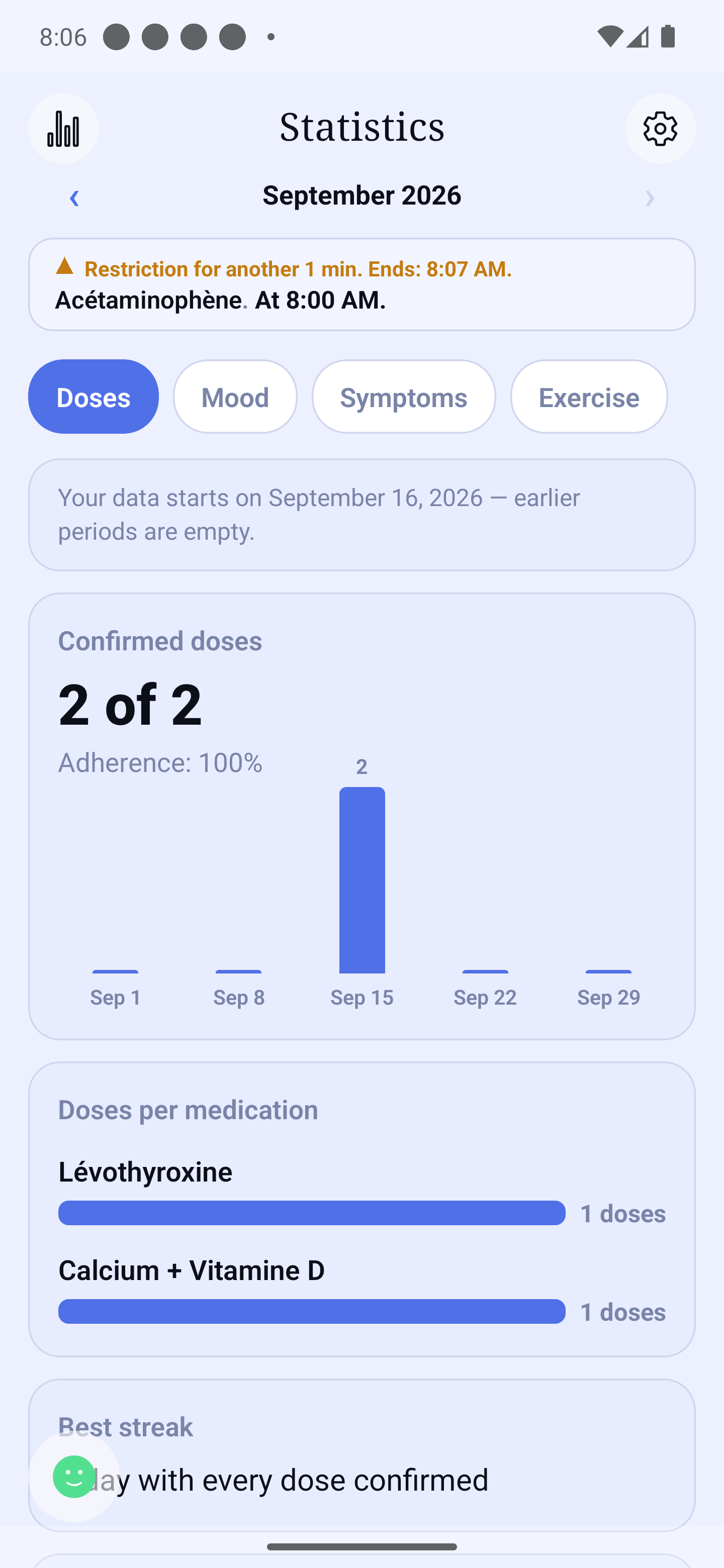
My statistics screen — this week's confirmed doses
Choosing the period
Under the screen title, the ‹ date › row moves you through time:
The ‹ and › arrows step back or forward one period at a time (a day, a week, a month… depending on the chosen granularity).
Tapping the centre date opens the picker: pills (Day, Week, Month, 3 months, Year) choose the width, then tap a day, a month or a year in the calendar and confirm with Choose. In Week, the whole week highlights; in 3 months, the tapped month plus the two before it ("the last 3 months").
This period is shared across the app (Journal, Statistics, Reports, Appointments). After about fifteen minutes of inactivity, the app returns to Today on its own.
What you can review
Tabs (Doses, Mood, Symptoms, Exercise, Quick notes) organise the cards:
Doses — the number of confirmed doses (as-needed doses are named separately, never counted in it), a sentence spotting when your doses are most often unconfirmed, then, for a chosen medication:
Time of intake — how close your scheduled intakes are to the planned time, and whether they are regular. A medication taken as needed has no planned time: the card says so in one sentence. A single row of medications, in this card, also drives the next card; switching from one medication to another reloads nothing.
"[Medication] · what you recorded" — first scheduled: how many doses a day (from… to…), the days with at least one missed dose, the doses recorded as skipped and the actual times taken, one row per planned time. Then as needed: the days without a dose, how many doses a day, the comparison with the previous period, the time of day, the shortest time between two doses ("Show this to your pharmacist") and the situations during which those doses were recorded. These are figures drawn from your own entries, with no judgement and no advice. A medication you deleted stays in the row, marked "Stopped", for the periods where it has doses.
Mood — at the top, a mood calendar (outside any card) that follows the chosen period: in Day, the face of the day and its entries; in Week, a row of 7 boxes; in Month, the month grid (Monday first); in 3 months, three grids; in Year, 12 month boxes with "N difficult days". Each box shows the face of the day's average (rounded to the nearest level, ties rounded down: 2 and 3 give face 2); a small dot marks a dip during the day (an entry two levels or more below the day's face); an empty box means no entry. Tap a day: "Average 3.4 · lowest: 2 · 4 entries", its entries and notes, and the "See this day in the Journal" link. Tap a month in the Year view to open it. Below: "Average mood" (every day counts once; at least 3 days must be logged), "Mood by day of the week" (from the Month period on) and "Mood and doses" (if doses are tracked).
Symptoms — your most noted symptoms and at what times of day.
Exercise — your activity minutes and how they break down.
Quick notes — choose a note at the top. You see how many times it was noted in the period. Only the notes you entered during the period appear at the top; if there are none, the card says: "No quick note during this period." For a note with a number (for example weight), a curve shows your measurements over time, with the list of measurements, "Lowest · highest" and, from 5 measurements, the "Average". With fewer measurements, the card says: "Not enough measurements for an average". If the same note was entered in two units, you see two cards, with no conversion: "Each measurement stays in the unit it was recorded in, never converted." These are figures taken from your entries. HoraDose shows no reference range and no "normal" value.
These statistics are a summary of your own entries. They are not medical advice. An "unconfirmed" dose was not necessarily missed — it is simply an intake you did not record in the app.
Free and Premium
The module is included for free for the most recent days (the same period as the free Journal). Longer periods — 3 months and 1 year — are part of Premium: they show a lock 🔒 and offer to discover Premium when tapped. The same applies to an older day, week or month, in the statistics and in the journal alike: a message explains the limit and offers to see the plans. Your data is never erased — it becomes visible again with Premium.