
My wake and bed times
Wake/bed medications, home banner, today’s adjustment
Why configure your wake and bedtime?
Some medications are tied to when you wake up (for example fasting before breakfast) or when you go to bed (for example melatonin 30 minutes before sleep). HoraDose computes the exact dose time from your wake/bed configuration — no need to recalculate manually whenever your schedule shifts.
Your wake and bedtime are used only to schedule these doses. They never silence your notifications: a medication due in the middle of the night still reminds you normally. To mute your reminders over a time range, use the Quiet hours setting (see the "Notifications & reminders" section).
Setting your default wake and bedtime
Settings → ME → My wake/bed times
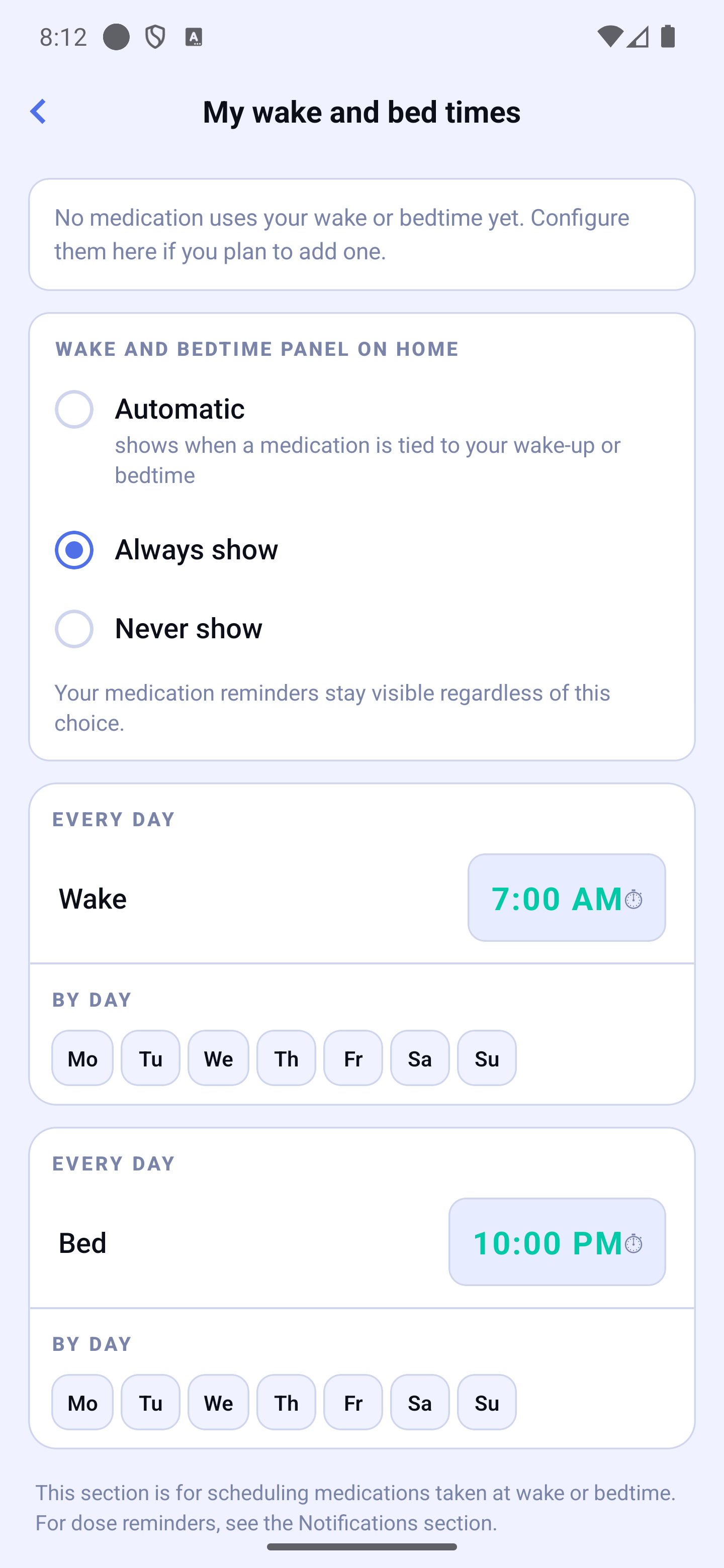
The screen shows two cards: Wake time (🌅) and Bedtime (🌙). Each behaves exactly like a meal card:
- EVERY DAY — your usual time (default 07:00 for wake and 22:00 for bed).
- BY DAY — exceptions for specific weekdays (for example a later wake time on Saturdays and Sundays).
Wake-up and bedtime on Home
Your wake-up and bedtime show as tiles in your day's timeline, at their time. At the top of My wake and bed times, choose when they appear: Automatic (when a medication is tied to your wake-up or bedtime), Always show or Never show. Your medication reminders stay visible whatever you choose.
Adjusting the time for today only
Got up later, or going to bed earlier tonight? Tap the Wake (or Bedtime) tile in the timeline, then "Change the wake-up time" (or "Change the bedtime") and pick the time with the wheel.
- Upcoming doses tied to wake-up (or bedtime) are re-anchored. Doses already taken never move — your history stays locked.
- The adjustment applies for today only: tomorrow, your usual time is back. There is nothing to "reset".
The same menu offers "Notification" (a reminder at wake-up or bedtime) and a shortcut to My wake and bed times.
Creating a "wake" or "bedtime" medication
In the "New treatment" assistant (see Adding or editing a treatment):
- At step 3, tap the On waking or At bedtime chip.
- At step 4, choose the moment (As soon as I wake up / After waking; Before bedtime / At bedtime / After bedtime) then the delay (for example 30 min after waking, or 1 h before bedtime).
Your reminders at night
By default, HoraDose reminds you of all your doses, including overnight ones — your wake and bedtime do not mute anything. If you don't want to be disturbed over a time range, turn on the Quiet hours setting in Settings → Notifications & reminders (see the dedicated section). Medications marked as important always ring, even during quiet hours.
Edge case — night-shift work
If you work at night and sleep during the day, simply set your wake and bedtime accordingly (e.g. wake 16:00, bed 07:00). HoraDose understands that your day runs the other way around and computes your "wake" and "bedtime" doses accordingly.
Edge case — going to bed after midnight
You can set a bedtime at 01:00. HoraDose understands that this bedtime technically falls on the next calendar day: a dose scheduled 30 minutes before bedtime (00:30) shows up correctly on your day.