
My treatments
The list of your medications, linked medications, stop, resume, delete, refills
Opening "My treatments"
Tap ⚙ at the top right of Home, then Treatments — or go through Settings → My treatments. This one screen gathers your medications and when you take them.
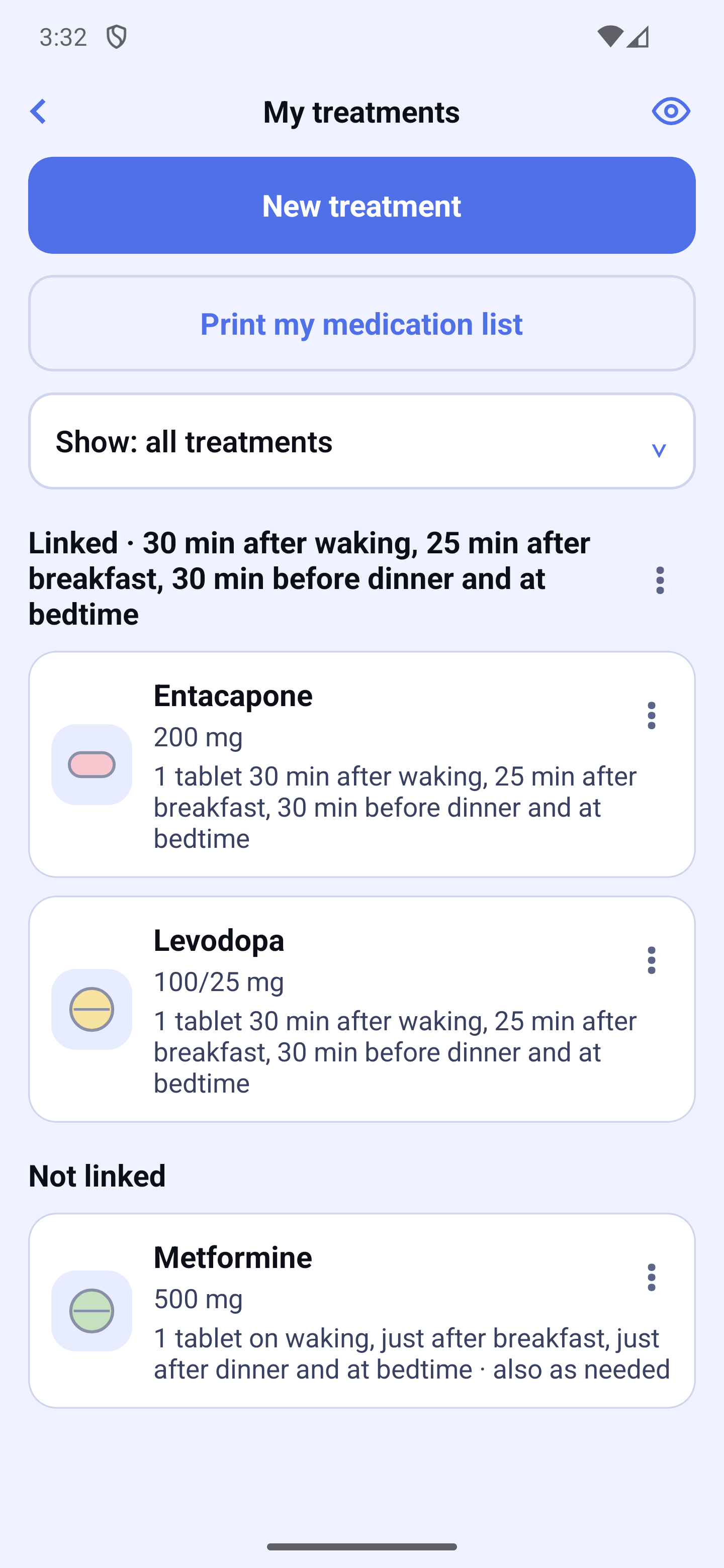
Each card shows the medication, its strength and when you take it, delay included: "1 tablet 30 min after waking, just after breakfast and at bedtime", "As needed"… Under the card, a tag flags a treatment that has not started yet ("Starts on …"), that is paused ("Paused until …") or that has ended ("Ended on …"). Tap a card to edit the treatment. A medication with no schedule shows "No schedule" and an "Add a schedule" link.
At the top of the screen:
- "New treatment" — opens the 5-step assistant (see the section Adding or editing a treatment);
- "Print my medication list" — a paper list to bring to your doctor or pharmacist: "Print" or "Share my list". The "My medication list" document carries your name (if you chose it on the Reports preview) and today's date, then, for each medication: strength, form, amount per dose, times, food restriction and start date. It always contains all your treatments, even when a filter is on — except the ones that have ended. A dose change already planned is shown under its date;
- "Show: all treatments" — a filter: a group of linked medications, a moment (on waking, at breakfast, fixed times, as needed…) or a state (Upcoming, Paused, Ended). While a filter is on, a line reminds you; "⟲ Show everything" brings back the full list. Treatments hidden by the filter are not deleted;
- the eye 👁 at the top right — the Day preview (see below).
Ended treatments do not appear in the list: choose the Ended filter to see them again.
Linked medications
Medications you take together, at the same moments, can be linked: they share the same moments, the same delays and the same days, and each keeps its own quantity. In the list they are grouped under a title that says when you take them, delay included — for example "Linked · 30 min after waking, 25 min after breakfast and at bedtime". The "Not linked" medications come next.
The ⋮ button to the right of a group title offers "Add a medication to these doses": the assistant opens, already linked to that group.
A linked medication starts at the next dose after the link: if you link it at 10 a.m., its first dose will be the following one, not the 7 a.m. dose that day. The assistant tells you when it will start.
A treatment's ⋮ menu
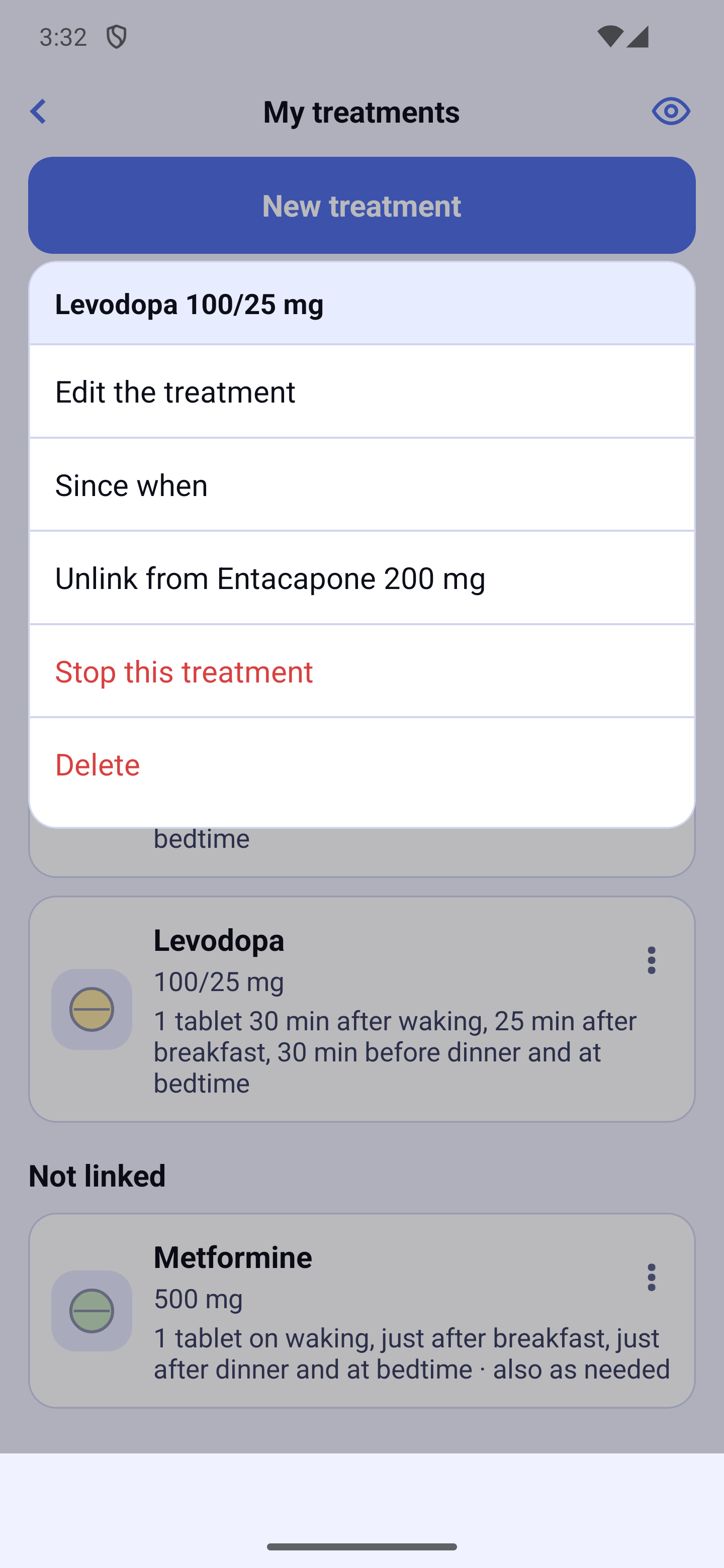
- Edit the treatment — reopens the assistant on this medication;
- Since when — since when you have been taking it and what changed (see below);
- Unlink from … (for example "Unlink from Entacapone 200 mg") — only for a linked medication. It keeps its current doses, but they are no longer shared: a change made to it will no longer affect the other one, and the other way round. A message confirms it; the other medication is not changed;
- Stop this treatment — or, for an ended treatment, Resume this treatment;
- Delete.
Stopping or pausing
"Stop this treatment" offers two choices: "I no longer take it", or "I resume it on…" with a date — that is a pause. Tap "Confirm". Reminders stop — for a pause, until the resume date you chose, then they come back on their own. The doses already recorded stay in your journal. If the medication is linked, only it stops: the other one keeps its doses.
To resume an ended treatment: Ended filter, ⋮ menu, "Resume this treatment". The screen reminds you what you will resume and asks from when: Today, Tomorrow or "Choose a date…".
Deleting
The treatment disappears from your list and its reminders stop. The doses already recorded stay in your journal. If the medication is linked, the other one keeps its doses.
Since when
This screen shows the treatment's periods: the ongoing one ("Ongoing since …"), upcoming ones (for example a dose change planned on a date) and ended ones. An upcoming change is marked "Can be cancelled": "Cancel this change" keeps you on the ongoing period, "Edit this change" reopens it in the assistant. Ended periods are read only.
Day preview
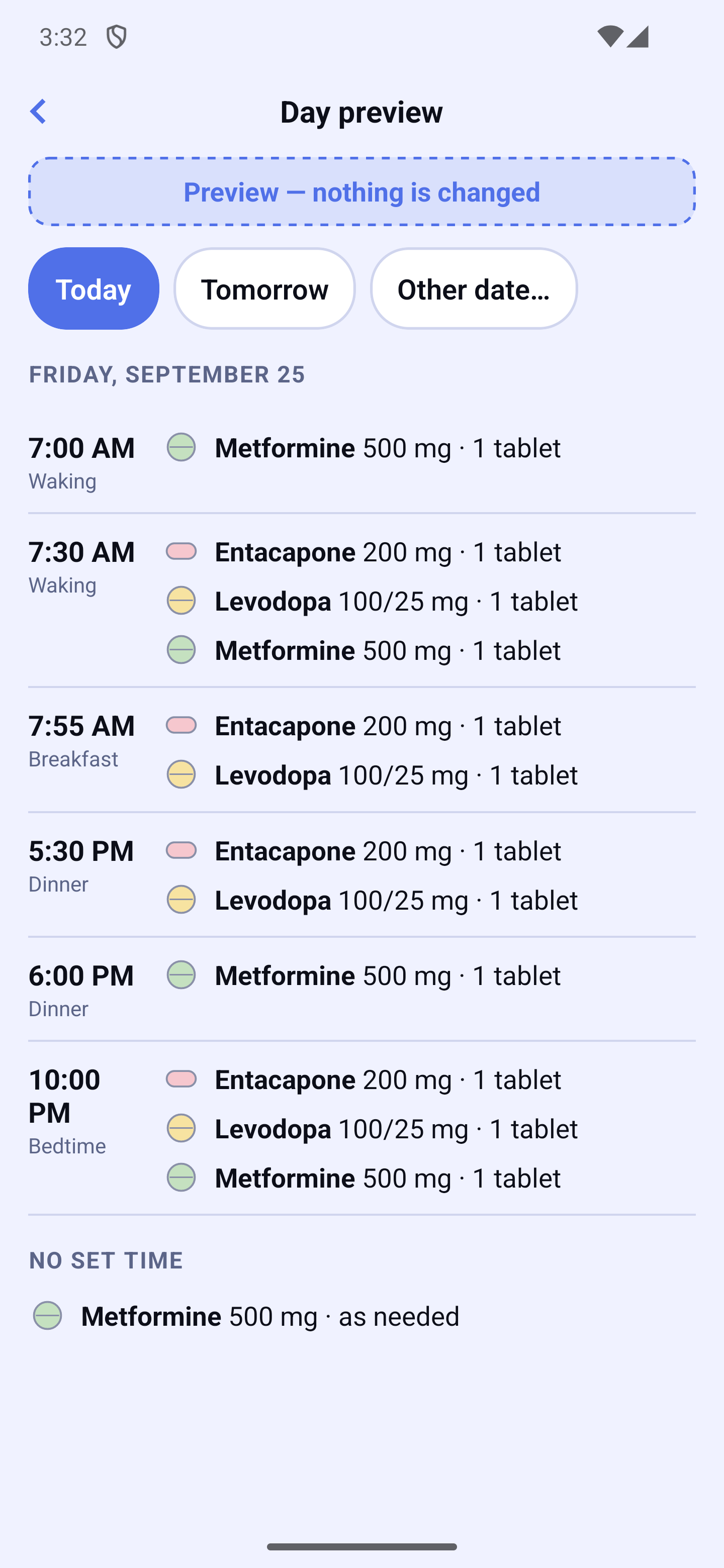
The eye 👁 opens a full-screen window showing a day's doses, hour by hour. At the top, the same date header as the Journal lets you pick Today, move forward day by day, or open a calendar for another date — never a day before today. Doses without a time (once during the day, as needed) are grouped under "No set time". It is only a check, read only: nothing is changed there, and the preview always shows what is planned, never what was actually taken. Tap "✕" (or the phone's back button, on Android) to close it.
Important medication
In Settings → Next dose display, tick the medications whose next dose of the day must stay always visible on Home, even when other doses to take already fill the space. It shows as a discreet 🕐 card with the planned time, under the doses to take, and becomes the usual card with its button when it is time to take it. That medication's time also shows first on the watch (Apple Watch, Wear OS), the widget and the Dynamic Island, even if another medication is due earlier. Reminders still ring for all your medications. If none is ticked, the day's next dose is shown.
Medication refills
Premium feature. HoraDose can remind you to refill a medication before you run out, and estimate how much you have left. Two paths lead to the same screen: ⚙ → Refills on Home (a small number there shows how many medications are due to reorder), or Settings → My refills.
- Track refills — turn on the switch to get a reminder before you run out.
- I refilled — back from the pharmacy, answer "How many did you receive?" (30, 90, 100 in one tap, or "Another quantity…"). The screen shows what you had left, what you are adding and the new count before you confirm; if what you had left was wrong, tap "Correct what I had left".
- Adjust the count — enter the real number if you have recounted your tablets. Half tablets are accepted: use the keyboard's decimal key (e.g. "45.5").
- Next reminder — "When to warn me": when you are about to run out (calculated from your stock), every 30, 60 or 90 days, or on a specific date. The next reminder date is shown in plain language.
Days left and run-out warning
The number of days left follows your schedules: their quantities, their days and their date ranges. If your treatment changes dose on a given date — say ½ a tablet until the 15th, then 1 tablet — the estimate crosses that change instead of extending your current rhythm.
For an "as needed" medication nothing can be predicted ahead: the estimate is then based on what you have actually taken over the past days. If a medication has both a regular schedule and as-needed intakes, both are counted.
The Refill screen also shows a small trend graph: the solid line shows your supply's recent evolution, the dashed "estimate" line shows where it is heading, and a vertical marker flags the planned refill date. The graph appears after a few days of confirmed intakes.
On the Refill screen, the chip under the tablet count always speaks about your supply ("≈ 40 days of supply"), and a grey line right below gives the date: "Based on your schedules, empty around September 13". Your reminder date stays on its own line ("Reminder on August 21") — they are two different things: one is computed from your treatment, the other is the reminder you picked (30, 60 or 90 days).
That dashed line follows your schedules day by day: it tilts more steeply from the day your dose goes up, and stays flat on the days you take nothing (every other day, certain weekdays…).
If your treatment ends before your supply does, the app does not pretend to guess a shortage: it shows "Covers the treatment through …" in green, and the curve stops at that date. HoraDose never assumes you will keep taking a medication beyond what is planned.
The "My refills" list shows the planned refill date (e.g. "Refill planned for October 3"). If your estimated supply may run out before that date, an orange message warns you: "Based on the estimate, your supply may run out around September 20, before your refill. Consider refilling earlier."
The number of days shown is always the next deadline that concerns you: if your supply outlasts the planned refill date, the app shows "refill in {n} d" (the real horizon); if the supply runs out first, it shows the days of stock left. Without a configured refill date and beyond 90 days of supply, it simply shows "over 90 d". Quantities display as whole numbers in lists.
The module tells you what to do, not just where you stand
On Home, one line answers the only question that matters: "2 medications to order this week", or "Nothing to order this week." It takes you to the list.
"To order" gathers everything coming up in the next 30 days, most urgent first, with the name, strength and quantity — ready to show at the counter. This list does not replace a prescription.
"How long does it take you to get your medications?" — a few days, about two weeks, or three weeks and more. This single setting decides everything: when you are warned, when a medication enters "To order", and when your caregiver is told.
The "when I am about to run out" reminder is computed from your real supply and moves on its own if your dose changes or you correct your count. When it moves, the app says so — it never shifts silently.
"Call my pharmacy" appears when your supply may run out before your reminder. The app always asks for confirmation first, and shows the number so you can dial it yourself. "I ordered" then keeps the alert quiet until it arrives.
"My trip" tells you how much you need for your dates, and above all how much is missing or how much will be left when you return — never a plain "you have enough".
Your prescription refills can be noted and are counted off, with your agreement, at each renewal. It is a reminder: only your pharmacy knows what is really left. At renewal, common quantities (30, 90, 100) are one tap away, and you can always type any other quantity.
If you have a caregiver (Ensemble plan), they are told once per medication. The notification never contains the medication name.