
Settings
Me, Reminders, My profile, Privacy, Preferences, Help, Danger zone
Accessing Settings
Tap the ⚙ button at the top right of Home, then Settings.
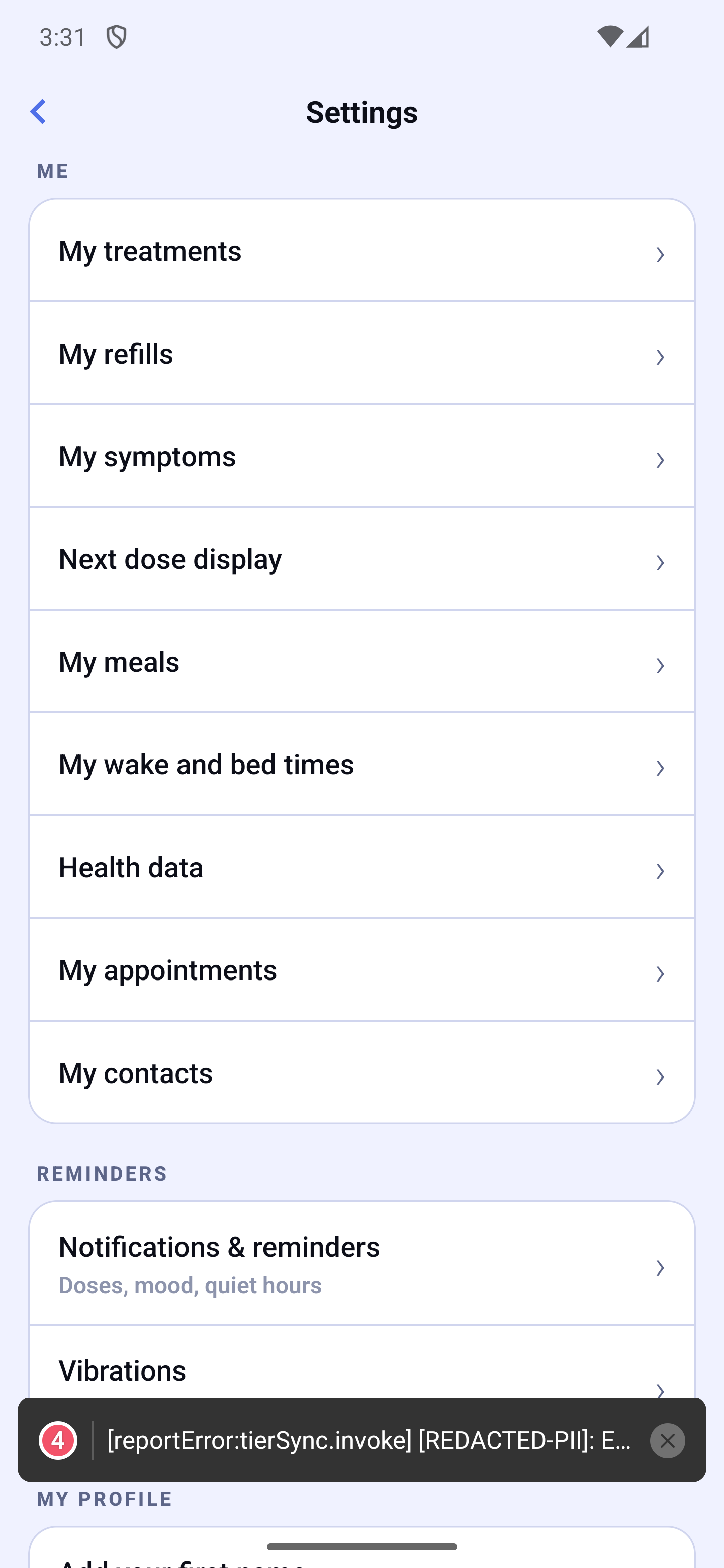
The screen is organised in sections:
1. ME
Everything about your treatment and your day.
| Row | Leads to |
|---|---|
| My treatments | Your medications and when you take them |
| My refills | Stock and refill reminders (Premium) |
| My symptoms | The list of symptoms you track |
| Next dose display | "Important" medications, always shown first |
| My meals | Meal times, automatic shift, meal length |
| My wake and bed times | Times used for "at wake-up" and "at bedtime" doses |
| Health data | Apple Health or Health Connect (Premium) |
| My quick notes | The ready-made notes of the journal's note button |
| My appointments | Default reminders and display on Home |
| My contacts | Contact settings |
2. REMINDERS
- Notifications & reminders — doses, mood, quiet hours (see the dedicated section).
- Live Activities (iPhone only, Premium) — your next dose in the Dynamic Island and on the lock screen (see "Apple Watch settings").
- Apple Watch (iPhone only) — watch vibrations and alerts.
- Vibrations — on button taps and when confirming a dose.
3. MY PROFILE
- Your first name — tap it to change it; Home greets you by this name.
- Last name — for the documents meant for your doctor (Reports, medication list, printed journal). It is never shared with your loved ones and only appears on a document when the "Show my name on the document" box is ticked on the preview.
- Date of birth — optional; chosen with three wheels (day, month, year) that never go past today. It is printed only if you tick "Show my date of birth" on the document preview. "Remove my date of birth" clears it.
- Security and privacy — protect access to HoraDose (Face ID, Touch ID, fingerprint or code). See the "Security" section.
- Google Drive backup (Android) or iCloud backup (iPhone) — an encrypted copy of your data. See the "Backup" section.
- Sync my devices — your code, syncing and the list of your devices.
- Subscription — your plan (Free, Premium or Ensemble), restore a purchase, enter a promo code. See the "Free version and subscription" section.
4. PRIVACY
This section groups three things: your rights over your data, a complete file to take with you, and the setting that decides whether HoraDose may send usage counters. Nothing here sends anything about your medications, schedules or health.
Your privacy choices
A screen that says, plainly, what we do with your data and what you can do with it: HoraDose does not sell your data, your health information stays on your phone. It lists your rights (export, erase, turn the counter off), what you accepted with the date (for example "18 or older", "HoraDose Cloud activation"), the privacy policy, the health-data policy and an address to write to us. "Erase all my data" opens the Settings erase flow directly.
Export all my data
A complete file with everything you entered — medications and schedules, doses, mood and journal, meals and wake times, appointments, contacts, settings — to keep or to switch apps. It is a readable text file (JSON), not protected: store it somewhere safe. Because it holds your health, the app first asks for your fingerprint, face or code. The file is then shared with the phone's share sheet and removed from the app.
Count how many people use the app
Once a day, the app sends a randomly drawn number, a few technical details (version, device, language) and the country you connect from, for example "Canada". It also counts which screens are used and which features are turned on, with nothing that points to you. Never your address or your movements, nothing tied to your name or your health. This information stays in Canada and is deleted after 400 days. The setting is on at the start; you can turn it off here, and it turns off entirely in one move.
5. PREFERENCES
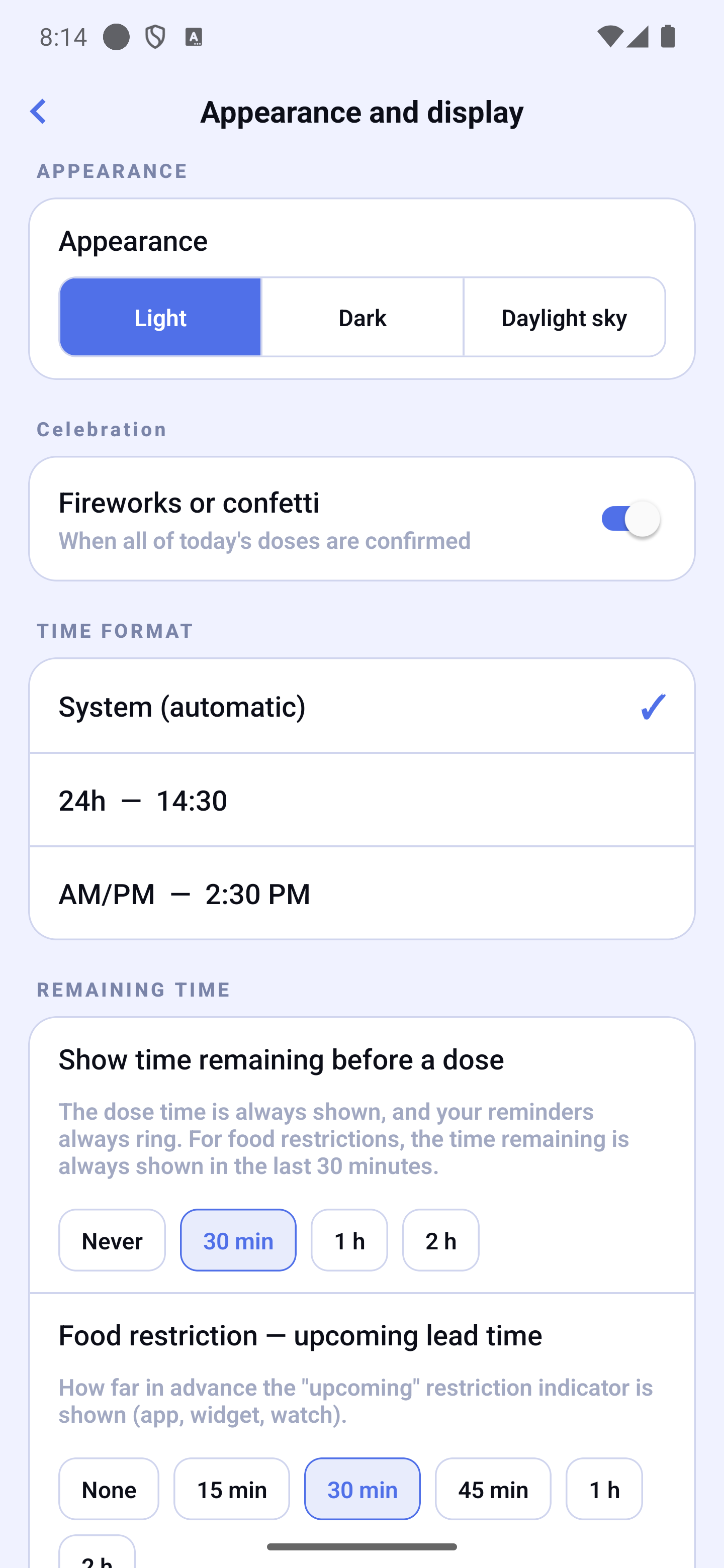
- Appearance and display — a page that groups:
- Appearance — Automatic (match your phone) / Light / Dark / Daylight sky. Automatic hands the decision back to your phone's own light-dark setting: the app turns light or dark whenever your phone does.
- Celebration — the fireworks or confetti when all of the day's doses are confirmed.
- Time format — System (automatic) / 24h / AM-PM.
- Show the time left before a dose — from when the "in 25 min" joins a dose's time: Never, 30 min (default), 1 h or 2 h before. The setting applies everywhere at once: Home timeline, top band, Apple Watch, Wear OS, widgets and lock screen. The dose time always stays shown and your reminders always ring — only the countdown goes away. For food restrictions, the top band shows the time left in the last 30 minutes anyway, even on "Never".
- Food restriction — "upcoming" lead time — from when HoraDose warns you that a food restriction is coming.
- Language — Phone language (default), English or Français. Each language is written in its own language, so you can find it again even after a wrong choice.
- Region — Canada or United States (the matching medication catalog).
- Health APIs — turns on looking up your medications in the official registries (DIN in Canada, NDC in the United States), used by label scanning in particular.
- Travel mode — keep your reminders on home time while you travel (Premium).
6. HELP
- Send a bug report — see the "Bug report" section.
- Version — the installed version, followed by the internal number in brackets (for example 1.0.0 (155)). Useful if you contact support. Tap the row to open About, which holds the legal links, the licences and "What you have accepted": the dated list of texts accepted in HoraDose, with "Send a copy". No health data appears there.
- Medical disclaimer — an important reminder about the medical use of HoraDose.
7. DANGER ZONE
Two separate actions, never a single button:
| Option | What it does |
|---|---|
| Erase this device | Removes your data from this device only. Your other devices and your backup keep working. |
| Delete all my data | Erases everything, everywhere: this device, your online backups and your links with loved ones. Your other devices will be disconnected. You confirm in two steps, with clear buttons. |